Get started
What is Ganttastic?
Last updated 27 July 2026
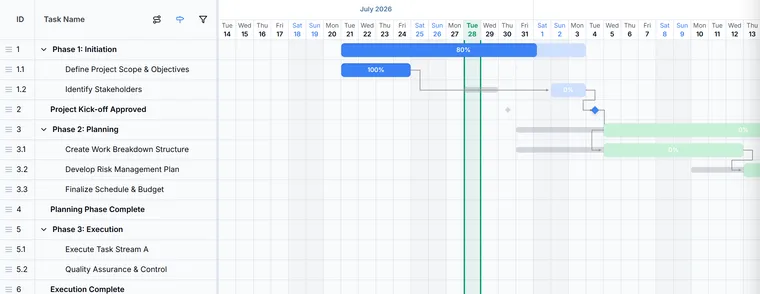
Ganttastic is a Gantt chart app that runs in your browser, built for planning projects and communicating the plan. You lay out tasks, milestones, and dependencies on a timeline, let AI draft or reshape the plan, track progress against a baseline, and share a live view with your team and stakeholders.
This page gives you the short version: what Ganttastic is for, who tends to use it, and the feature set at a glance. When you are ready to build something, start with your first project, or open the app and try it without an account first.
What Ganttastic is for
Ganttastic exists because plans buried in spreadsheets stop being read. The idea is that the plan should be a picture: one interactive timeline that the whole team and every stakeholder can read at a glance, and that stays current as the work moves.
In practice you use it to lay out the schedule (tasks, sub-tasks, milestones, and the dependencies between them), to share that schedule with the people who need it, and to adjust it when reality disagrees with the plan. Baselines keep a record of what you originally committed to, so the gap between plan and reality stays visible instead of quietly disappearing.
Who uses Ganttastic
Ganttastic is built for people who own a schedule and need others to understand it:
- Solo project managers running client or internal projects end to end.
- Small PMO teams standardizing how plans are drawn and reported.
- Program teams coordinating several related projects, often through portfolios.
- Founders and executives who need a roadmap stakeholders can actually read.
It is deliberately aimed at planning and communication rather than heavy task tracking or deep portfolio analytics.
Key features at a glance
Everything in the table links to a page in this guide with the full detail.
| Feature | What it does |
|---|---|
| Gantt chart view | An interactive timeline: drag bars to reschedule, with dependency arrows, milestone diamonds, baseline bars, and a live today line. |
| List view | The same tasks in a table for quick bulk edits. Switch between Gantt and List in the toolbar. |
| My Tasks | One list of the tasks across your active projects, sorted by what is overdue and due soon. Shown on the free Team Member plan. |
| Dashboard | A health overview across projects: overall progress, overdue tasks, and work due soon. Project Manager plans. |
| Tasks and sub-tasks | Break work into tasks and one level of sub-tasks that roll up to the parent bar. |
| Dependencies | Four link types (FS, SS, FF, SF) with optional lag or lead time. Circular links are detected and blocked. |
| Milestones | Diamond markers for key dates and decision points. |
| Auto-scheduling | When a task moves, dependent tasks downstream move with it. |
| Baselines and variance | Snapshot the plan with Set Baseline, then compare where you are against where you said you would be. |
| AI Project Wizard | Generates a draft plan from a plain English description, structured by the methodology you pick, and suggests task owners. |
| AI Chat | Ask questions about your plan or request changes in plain English, with a preview before anything is applied. |
| Forecasting and what-if | Finish estimates based on your delivery pace so far, plus impact analysis for changes you are considering. |
| Portfolios | Group related projects into one combined timeline. |
| Sharing | Invite people as Editors or Viewers, or publish a public link that anyone can open without an account. |
| Import | Bring in MS Project files (XML and MPP), CSV and Excel exports from other tools, and .gwise files. |
| Export | PNG, PDF, Excel (.xlsx), and the portable .gwise format. |
| Project templates | Start a project from a saved template. Part of the Enterprise plans. |
| Mobile | A Gantt view built for touch, with bottom navigation and a floating add button. |
A planning and communication layer, not everything
Ganttastic is a planning and communication layer. It sits above the tools where day to day work happens; it does not try to replace them.
- Keep tickets, bugs, and sprints in your task tracker. Ganttastic holds the schedule view of that work, not the work itself. You can import exports from tools like Asana or Monday.com to get started.
- Keep documents and decisions in your wiki. Ganttastic ties a plan to dates, owners, and dependencies, not to long form content.
- Keep conversations in chat. Ganttastic gives those conversations a shared picture to point at, including public links that viewers can open without signing in.
Frequently asked questions
Easier to try than to read about.
Open Ganttastic in your browser and follow along. No account needed.